
Auto-Upgrade Docker Images
Contents
Why automatic updates?#
Software ages. Or rather, time passes it by, meaning it requires maintenance and must be kept up to date.
“Code is a liability (not an asset).” - Cory Doctorow, Jan 2026
On my blog, I have frequently reported on issues such as critical vulnerabilities in Gitea or in PHP, resolved system crashes, and recovered unintentionally published pages. All of which could be addressed through updates or reconfiguration.
My server’s operating system and the key programs running on it are already set up for automatic updates, as described in my article on server auto-upgrades.
Nevertheless, I am not quite finished with this topic.
Updating Docker images with Watchtower#
- It is no longer actively maintained and has been archived. However, there are forks that are still being maintained.
- To function, it requires access to the Docker daemon via
docker.sock. This is like granting the container root access to my system which I want to avoid in the future.
Looking for a direct replacement for Watchtower? Linuxhandbook lists a few solutions here. A common drawback among them, is that they either only notify you about available updates without deploying them, or they also require docker.sock to be mounted as a volume.
A Script-Based Solution#
In search of an approach that avoids the security risk posed by docker.sock, I quickly arrived at the idea of running a script daily via cron. Since this script executes with root privileges, it can run Docker commands directly.
Complicated: docker pull, comparing against existing images, and deploying if necessary#
My first script is 164 lines of code (164loc) and performs the following steps:
- Verifies that the required tools
curl,docker,docker compose, and thedocker-compose.ymlfile-are installed and functioning correctly. - Identifies the current image digests for the services defined in the
docker-compose.ymlfile. - Updates the registry for each service using
docker compose pull. - Compares the “new” image digests with the “old” ones using
docker image inspect. - Launches the new images via
docker compose upand saves the logs. - Sends a notification to me via ntfy if any updates have taken place.
This approach proved too complicated. The tool I use, docker compose, includes the necessary option out of the box already: docker compose up --pull always.
Simple: Include everything in a single command via an option#
The core of my new script (61loc) looks like this:
compose=(docker compose --progress plain -f "$COMPOSE_FILE")

before=$("${compose[@]}" ps --all --quiet | sort)

if output=$("${compose[@]}" up -d --pull always --quiet-pull --wait \
    --wait-timeout "$WAIT_TIMEOUT" 2>&1); then
  status=0
else
  status=$?
fi

printf '[%s] docker compose up (exit %s)\n%s\n\n' \
  "$(date -Is)" "$status" "$output" >> "$CHANGELOG"

if (( status != 0 )); then
  report_failure "WARNING: Docker update failed" "warning" "$output"
  exit "$status"
fi

after=$("${compose[@]}" ps --all --quiet | sort)
if [[ "$before" != "$after" ]]; then
  notify "INFO: Docker containers updated" "white_check_mark" "$output"
fi
In the script, I capture the state prior to the update by listing all services specified in the Compose file and storing them in a variable. I then execute docker compose up -d as usual, but include the flags --pull always, --quiet-pull and --wait --wait-timeout <time[s]>.
The pull option prompts Docker to check the registry for new images, which are then downloaded and deployed if available in non-verbose fashion (no progress for individual download packages, etc). The timeout sets a specific duration for the command to complete before it terminates with an error, ensuring the script cannot hang indefinitely.
The final steps involve documentation and monitoring: the command’s output is recorded in a changelog, and in the event of a failure, I receive a notification implemented via Ntfy, as described in my post on server logging. This is where the initial state (captured before the update) comes into play: I only receive a notification if an error occurs or an update is performed.
Finally, I make the script executable per chmod +x docker-image-update.sh and assign ownership to root with chown root:root docker-image-update.sh.
Cron job entry#
After manually testing the script (./docker-image-update.sh) and verifying its output, the changelog, and the new container versions, I configure the cron daemon to execute the script daily:
schallbert@machine: crontab -e
[...]
0 2 * * * /path/to/docker-image-update.sh
Which version was installed?#
Instead of using service version labels, Docker relies on image digests. This sha256-hash is unique to each image, but it is not human-readable:
sha256:94a00394bc5a8ef503fb59db0a7d0ae9e1110866e8aee8ba40cd864cea69ea1a # example Image digest
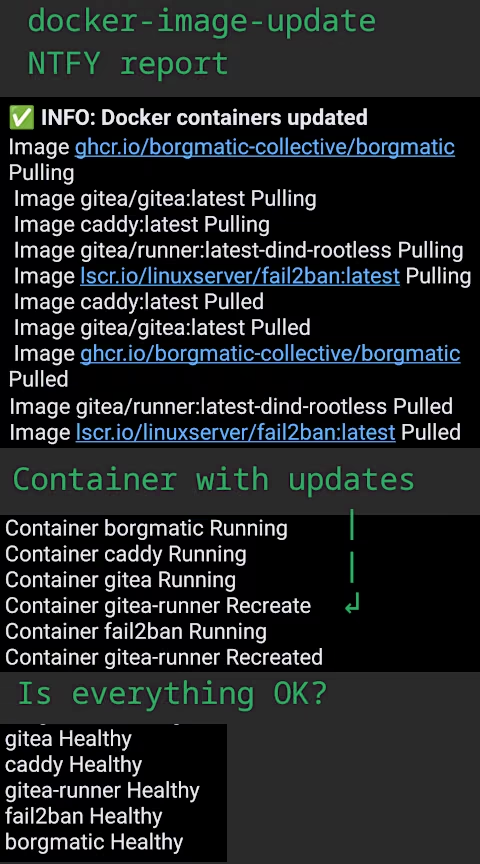
Gitea v28.2.1 are not supported by default in image metadata. Consequently, I do not currently have a solution for displaying a version number. I chose to omit the digests from the output altogether.
Notification upon update#
The notification could be improved: ideally, I only need the names of the containers that were updated and confirmation that all images are “healthy” afterward. At present, I receive the full status of the containers, from which I would first need to extract the relevant information. Given that the added value of filtering this data is minimal, it is not worth the time required to expand the script. After all, the Recreate process already indicates which container has been updated.
I am satisfied. By using just a few lines of code, relying on built-in tools and only cron as an additional dependency, I have successfully solved the problem of updating containers managed via Docker Compose from the host machine.