
Continuous Deployment for a Hugo site
Contents
I have just migrated my website from Hugo to Jekyll. Now, I want to automate the build and deployment process so that changes are rolled out as soon as I finish an article and push it via git push followed by a merge into main to my Gitea instance.
The Command Chain#
I rent a VPS where I run all my applications in Docker. The task now is to create a workflow in Gitea (“Actions”) that checks out the repository update, passes it to Hugo to generate the HTML pages, and then saves the output to the disk in a location where my web server can read and serve the files.
Lessons Learned#
I had already managed to set this up for my Jekyll website build and deployment, so I can draw on some previous experience.
Typically, standardized actions are used for this purpose. I’ll simplify things significantly here and list only the key components, without deep-diving in messy details like permission settings (is Hugo allowed to write to this folder? Does the hugo user have sufficient privileges?):
- checkout makes a specific version of the source repository available
- actions-hugo installs Hugo within the Action’s virtual machine so the website can be built
- upload-artifact uploads the site generated by Hugo to the web server
However, since I am operating within Docker on the same machine, I can skip the hassle of logging into the web server “from the outside”. So, I’m taking a different approach.
Docker shared volumes#
I can make the built files directly available to my Caddy application by passing the volume (that Caddy reads from) through to the Action.
Heads up: Action volume != Hugo volume#
But this doesn’t work with actions-hugo: It is not a Docker container itself, so it cannot mount volumes. While it does successfully build the website, it sends the artifacts into oblivion as soon as the Action finishes running.
So, I need a Hugo runtime that executes inside a Docker container itself, following the DinD approach. I can then pass the volume with write access.
The workflow#
But which Docker container should I choose?
Imagine here several hours of research and numerous failed attempts while setting up the workflow on my server.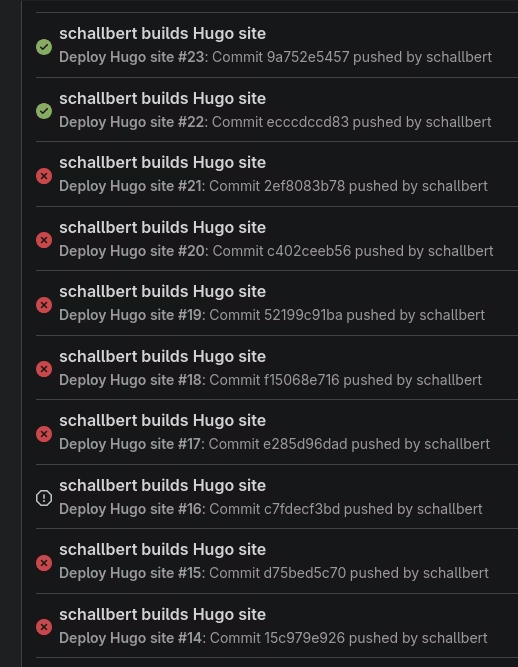
My investigation revealed the following:
checkout@v4requires Node.js—specifically, at least version node:18. The Docker container must have it installed.- The action requires
git. Ideally, the Docker container should already include this as well. - Hugo needs
go. That makes sense.
Adjusting the runner operating system#
My runner from 2023 did not age well. It is based on node:16-bullseye, a Debian-based VM. I experiment a bit with Alpine, but that installation is too minimal for my needs and would require too many manual adjustments. After all, the runner has to execute other workflows besides this one. Ultimately, I decide to stick with Debian and just upgrade the Node version. The implementation in the runner configuration looks like this:
# /gitea/runner/config.yml

# The labels of a runner are used to determine which jobs the runner can run, and how to run them.
# Like: ["macos-arm64:host", "ubuntu-latest:docker://node:16-bullseye", "ubuntu-22.04:docker://node:16-bullseye"]
# If it's empty when registering, it will ask for inputting labels.
# If it's empty when execute `deamon`, will use labels in `.runner` file.
labels: [ubuntu-latest:docker://node:20-bullseye]
Afterwards, the runner container must be restarted. Ideally, you should reboot Gitea as well; this ensures that runner registration works reliably.
Writing the workflow script#
To handle the dependencies described above, I’m opting for a “batteries-included” approach. This allows me to assemble the components without manual adjustments and rely on the long-term maintenance of the containers, given their widespread use (with pull counts in the millions). This website was very helpful in making my selection.
Finally, I create my workflow based on the container from Hugomods.
# /.gitea/workflows/build-deploy-with-hugo.yml

name: Deploy Hugo site
run-name: ${{ gitea.actor }} builds Hugo site
on:
  push:
    branches:
      - main

jobs:
  # Build job
  build:
    runs-on: ubuntu-latest # this is the "label" the runner will use and map to docker target OS
    container:
      image: hugomods/hugo:latest
      volumes:
        - /tmp/blog-artifacts:/tmp/blog-artifacts

    steps:
      - name: --- CHECKOUT ---
        uses: actions/checkout@v4
        with:
          submodules: recursive  # Fetches Hugo themes
          fetch-depth: 0

      - name: --- BUILD WITH HUGO --- # chown -R hugo /tmp/blog-artifacts
        run: |
          hugo \
            --minify \
            --cleanDestinationDir \
            --destination /tmp/blog-artifacts
Cleaning the destination folder#
In the example above, I opted for a “direct deployment”. This is a basic approach without a safety net, and without copying artifacts around or restarting the server. The reason: the Hugo build process takes less than 2,000ms for my site. It is only within this window that Caddy could theoretically encounter and serve “corrupt” data. Specifically, the window is even smaller as occurrence is limited to the Hugo build writing artifacts to the disk.
To minimize inconsistencies regardless, I use the --cleanDestinationDir option with Hugo. This ensures the destination directory is always clean; consequently, in the event of an issue, Caddy won’t display a broken site but will instead generate a 404 error.
Submodules#
As noted in my project documentation, you can use “submodules” in Hugo to load themes. These are integrated into the project and—provided they are linked correctly—can be utilized within the workflow:
with:
submodules: recursive  # Fetches Hugo themes
fetch-depth: 0
If everything is configured correctly, you should not encounter the following error message:
# workflow action's error message due to incoherent submodules' commit references
# actions/checkout@v4:
Fetching submodules
/usr/bin/git submodule sync
/usr/bin/git -c protocol.version=2 submodule update --init --force
Submodule 'themes/terminal' (https://github.com/panr/hugo-theme-terminal.git) registered for path 'themes/terminal'
Cloning into '/workspace/schallbert/blog-hugo/themes/terminal'...
fatal: remote error: upload-pack: not our ref 719505fc89332baa69bffb90cee708ff124dd143
Fetched in submodule path 'themes/terminal', but it did not contain 719505fc89332baa69bffb90cee708ff124dd143. Direct fetching of that commit failed.
Error: The process '/usr/bin/git' failed with exit code 1
Error: Process completed with exit code 1.
A prerequisite is that the submodules have been correctly loaded locally:
schallbert@machine:~ git submodule add -f https://github.com/<my/hugo-theme>.git themes/my-hugo-theme
schallbert@machine:~ git submodule update --init --recursive
The status check must not return an empty string; instead, it must include a commit hash. Example:
schallbert@machine:~ git submodule status
44d9a1890d228745ffc300b37a7d73e940ef9fa9 themes/terminal (v4.2.5)
Further confirmation is provided by the .gitmodules file, which must contain a reference to the theme:
schallbert@machine:➜/blog git:(main) ✗ nano .gitmodules
[submodule "themes/terminal"]
path = themes/terminal
url = https://github.com/panr/hugo-theme-terminal.git
If this does not work, the submodules must be completely removed and then re-initialized as described above:
git submodule deinit -f themes/<my-theme>
git rm -r --cached themes/<my-theme>
rm -rf .git/modules/themes/<my-theme>
Common Issues: Hugo Versions and Deprecations#
The checkout action completed successfully, but the Hugo build fails:
error calling partial: "/workspace/schallbert/blog-hugo/layouts/_partials/head.html:37:40": execute of template failed: template: _partials/head.html:37:40: executing "_partials/head.html" at <$.Page.Language.Locale>: can't evaluate field Locale in type *langs.Language
Error: Process completed with exit code 1.
Locally on my machine, Hugo builds successfully but issues a few warnings:
Changes to Language Identifiers and Evaluation as of v0.158#
schallbert@machine:➜/blog git:(main) ✗ hugo build --logLevel info
WARN  deprecated: site.Language.Locale was deprecated in Hugo v0.158.0 and will be removed in a future release. Use .Page.Language.Locale instead.
WARN  deprecated: .Language.Lang was deprecated in Hugo v0.158.0 and will be removed in a future release.
You might think these errors would be easy to fix. Unfortunately, they can be very good at hiding:
- in submodules loaded as third-party content (e.g., in themes). A project-wide search in the IDE usually excludes submodules and yields no results.
- as variables in your own code that access the old parameters only indirectly: Up until now, I’ve been using
.Page.Site.Home.AllTranslationsto determine if I am currently on the “main language” version of a given page. The scoping alone is illogical, and in my opinion, it is rightly being removed. What I want to achieve can now be done much more easily using.Page.Language.IsDefault.
Updating Submodules#
I see two possible approaches for handling submodules:
- Contact the maintainers (or open an issue) to let them know their code is becoming outdated and ask them to update their themes.
- Copy the affected files out of the submodule and integrate them into my own folder structure. In my case, for example, the affected
language-menu.htmlwould find a new home at/layouts/partials/language-menu.html. I can then fix the issues there myself.
Implementing Custom Solutions#
If the error message doesn’t make the solution obvious, the Hugo community is a great resource. For instance, there is detailed documentation available regarding the deprecations in v0.158.
Comparing Versions#
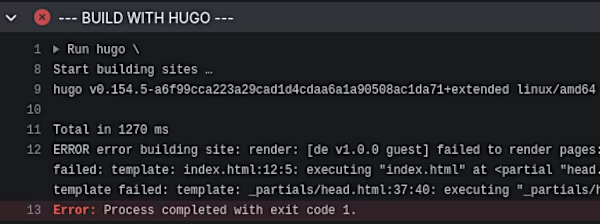
Hmm. As the image shows, my container uses the hugo extended package from hugomods, which provides version v0.154.5; I had selected a stable release for the Action. Let’s compare this with my local version, which now builds perfectly without a single warning:
➜  blog git:(main) ✗ hugo version
hugo v0.162.1+extended linux/amd64
The classic scenario: A change introduced in v0.158 altered the internal API. Older versions don’t recognize the new fields and throw errors. Newer versions, however, flag the use of the old fields as an issue.
I believe these problems can only be reliably avoided if the pipeline is identical for both local and remote environments. In other words: boot up a virtual machine on your local computer running the CI operating system and encapsulate everything within Docker. That certainly makes sense if you work in a larger organization where multiple users face this same issue.
To fix the problem, I switch to the image: hugomods/hugo:latest version within the remote container instead. However, I still end up with version mismatches between my local setup and the CD pipeline. The latest version frankly isn’t available for my operating system yet, and the Docker release also lags slightly behind the original releases.
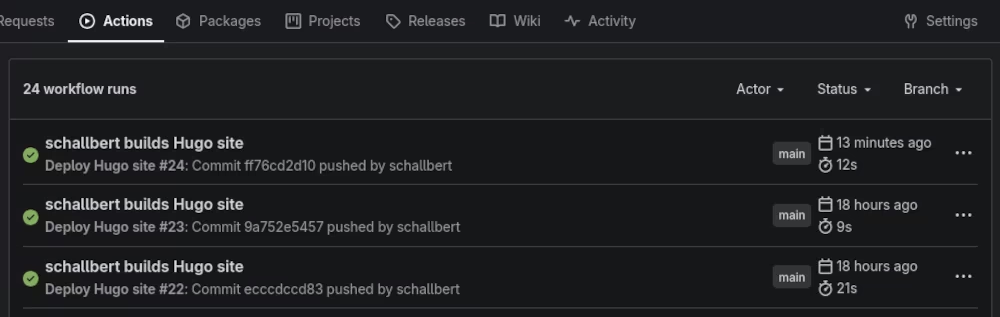
The build and release times are fantastic, aren’t they? Getting a website change online in just 12 seconds, including spinning up the container and so on, is something I’ve certainly never experienced before. The process takes around 20 seconds when it has to fetch and download container references from scratch, such as when the latest tag in the registry is updated.
The linked article offers a detailed benchmark comparing Hugo and Jekyll.