
htmltest configuration ideas for Hugo
Contents
I am now nearly finished migrating my website to Hugo. I had to make several adjustments to the front matter of each article so that they would function in Hugo much as they did in Jekyll. Changes to the folder structure, partly from the migration itself and partly from my experience as an author, meant I had to revise links in practically every article along the way. I now have nearly 340 of them, counting translations.
I cannot manage the sheer volume of links without some assistance. So, I need a tool.
htmltest#
Htmltest is a utility that scans HTML files for issues. Among other things, it tracks down broken links. I install it using
# Red Hat-based Linux package manager install command
sudo dnf install htmltest
and run it against the HTML files built by Hugo in the /public directory:
htmltest public/
# [...]
✘✘✘ failed in 2.890119823s
2612 errors in 337 documents
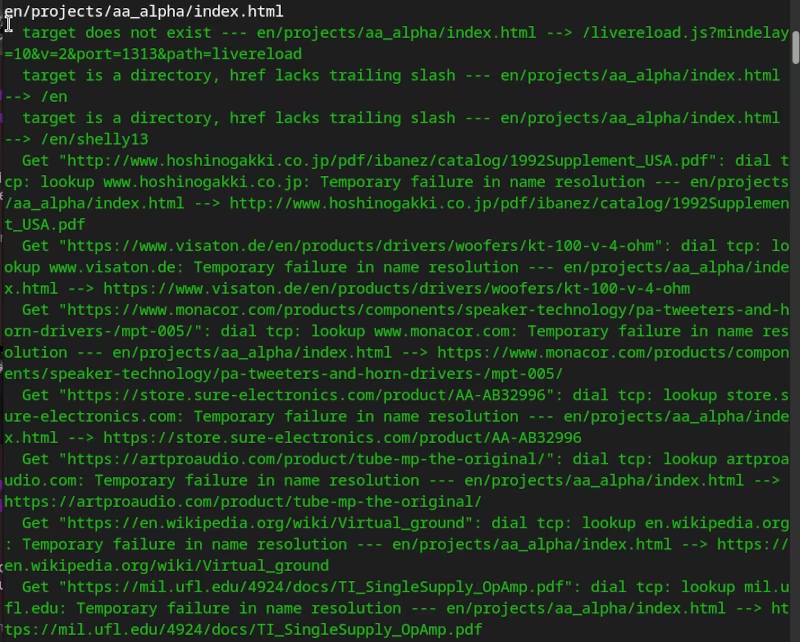
That is quite a lot of errors! Furthermore, the way the information is presented seems rather cluttered to me: see the image.
Redirecting output to a file#
Consequently, I am finding it quite difficult to work with this tool at first. I had assumed a few links might have broken, but I certainly didn’t expect thousands of errors. So I fell victim to the typical “not-invented-here” syndrome and programmed my own tool in Python, which, in hindsight, turned out not to be good enough. In short:
Htmltest is a good and incredibly fast tool. If you make its output readable and interpret it correctly, you can be quite happy with it. After a bit of experimentation, I arrived at the following command:
htmltest public/ 2>&1 | ansi2html > htmltest-output.html
Meaning: “Run htmltest in the
/public/folder. Redirect errors fromstderrtostdout. Pipe the output to ansi2html1. Write its output to a file namedhtmltest-output.html.”
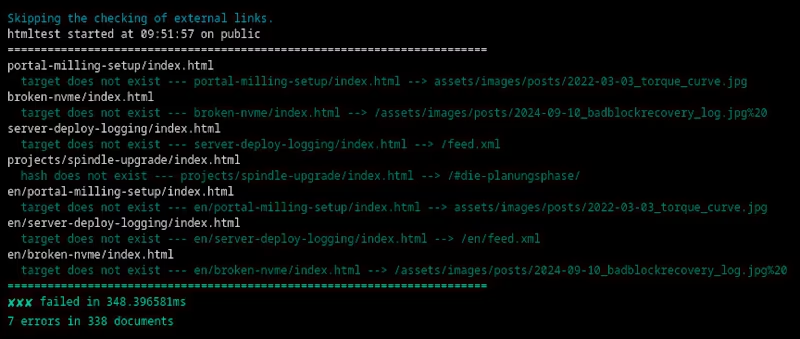
That already looks much better!
Error categories#
For my purposes, the errors found by htmltest can be sorted into a few categories:
- Hugo-specific errors, such as “target does not exist” messages caused by
livereload.js. - Incomplete links that work in practice but trigger “href lacks trailing slash” errors. These types of errors account for the lion’s share of the reported issues.
- Lookup errors (
GET <src> [...] failure in name resolution) caused by a lack of connection, insufficient permissions, active bot protection, or the target server being offline. - Hard “target does not exist” errors caused by broken links. These are the specific ones I actually wanted to fix.
Cleaning up the log#
How do I ensure only category 4 errors are displayed? By making a few changes to the tools and resolving the trailing-slash errors.
Category 1 errors, triggered by Hugo’s useful livereload function, look like this:
target does not exist --- en/tags/tools/index.html --> /livereload.js?mindelay=10&v=2&port=1313&path=livereload
LiveReload is the feature that saves me from constantly hitting F5 in the browser window whenever Hugo builds the site after I save a Markdown file. However, I can temporarily disable it for the test. The following solution reduces the number of generated errors by one per HTML page:
hugo server --disableLiveReload
I avoid category 3 lookup errors by focusing on internal links, over which I have complete control. The -s, --skip-external parameter in htmltest helps with this:
htmltest -s public/ 2>&1 | ansi2html > htmltest-output.html
# [...]
✘✘✘ failed in 494.7678ms
446 errors in 337 documents
I can fix broken external links later. For now, I want to resolve the issues caused by the migration.
“Missing trailing slash”: Fixing errors via markup#
I struggled for a long time with the many “href lacks trailing slash” errors, as I would have had to append a / to almost every Markdown link in every article. Fortunately, I found a solution in my render-link.html markup:
{{- /* /layouts/_markup/render-link.html */ -}}

{{- $url := .Destination | safeURL -}}
{{- $is_external := or (strings.HasPrefix $url "http://") (strings.HasPrefix $url "https://") -}}
{{- $is_anchor := strings.HasPrefix $url "#" -}}
{{- $is_asset := strings.HasPrefix $url "/assets/" -}}

[...]

{{- /* Add / to internal paths that have no file extension */ -}}
{{- if and (not $is_external) (not $is_anchor) (not $is_asset) -}}
  {{- $parsed := urls.Parse $url -}}
  {{- if and $parsed (not (strings.HasSuffix $parsed.Path "/")) (eq (path.Ext $parsed.Path) "") -}}
    {{- $url = printf "%s/" $url -}}
  {{- end -}}
{{- end -}}

[...]
Meaning: Internal links that point to neither headings (
is_anchor) nor media files (is_asset) have a/appended if, and only if, they have valid syntax (parsed) and do not already end with a slash.
This resolves 95% of the error messages, resulting in cleaner HTML. I handle the remaining 5% by adding a few slashes in the Hugo configuration. Examples:
# hugo.yml
url: "/en/" # /en -> /en/
logoHomeLink: "/en/" # /en -> /en/
Done! All that remain are hard internal errors.
htmltest -s public/ 2>&1 | ansi2html > htmltest-output.html
# [...]
✘✘✘ failed in 359.28ms
102 errors in 84 documents
Manual Search and Fix#
What follows is purely a matter of tedious legwork. I open the target document (the one being linked to) and check for inconsistencies, such as heading links that differ between languages. If I find any, I add specific anchor links to the heading.
### Heading {#heading3}
If everything is fine in the target file, I then open all the source files that use the broken link and correct it manually. In most cases, the target file has moved to a different folder, or the language prefix is incorrect.
The Result#
After a few hours of exhausting, lab manual work, I am rewarded:
htmltest public/ -s 2>&1
Skipping the checking of external links.
htmltest started at 10:51:23 on public
========================================================================
✔✔✔ passed in 238.970354ms
tested 338 documents
Soon I’ll be able to go online with my new-old site!
ansi2html (or colorized-logs) is a utility that converts console output to HTML, including formatting and text colors. ↩︎