

act_runner rootless: no start
Contents
The error#
My docker-in-docker (DinD) act_runner crashes shortly after starting with the following error message:
![Image: console window with docker logs text output: `\[rootlesskit:parent\] error: failed to start the child: fork/exec /proc/self/exe: operation not permitted`](/assets/images/posts/2026-03-28-act_runner-dind-failed-to-start-child-problem.avif)
Issue ticket on Gitea#
I have created a ticket for this issue in the Gitea community (issue #721). Below, I’ll go into my own findings and summarise the discussion a little.
Problem with kernel permissions?#
In a Docker-in-Docker configuration, the act_runner must run its own Docker daemon. Only then can the runner create its own containers for the actions. For security reasons, this is not permitted by default.
Why containers are not allowed to start other containers#
In the context of act_runner, an action executes code that is itself part of the repository. If malicious code is introduced into the job container unnoticed, e.g. by a ‘collaborator’, it can, in a Docker installation without DinD, under certain circumstances potentially gain direct access to the host system.
Consequences if something goes wrong despite DinD#
When using the DinD concept, an attack can result in access to the dockerd process within the act_runner container - and only if the action is not properly encapsulated. Still not ideal, but acceptable: when the container is restarted, the status quo ante is restored. Access to the host system is indirect, as the container itself is equipped with kernel features.
Simple solution: Start the DinD container as privileged#
To allow the DinD container to set up its own actions, privileged: true can be set in the configuration. This grants the container all kernel capabilities. According to the (excellent) OWASP Security Cheat Sheet, this should be avoided where possible. Should act_runner itself now come under attack or reveal critical security vulnerabilities, the intruder would already have every opportunity to bypass the encapsulation from the host system.
If you want to take the easy route, the corresponding docker-compose.yml file looks as follows.
# docker-compose.yml
# section ACT_RUNNER
runner:
    image: gitea/act_runner:latest-dind-rootless
    container_name: gitea-runner
    privileged: true
# [...]
“And remember: Do not run containers with the –privileged flag!!!” - OWASP’s Docker Security Cheat Sheet, 2026 License
Dead end: Only grant the rights that are absolutely necessary#
After a quick search, I find an article on CodeStudy.net1, which deals with the topic of DinD. From this, I put together some changes to my docker-compose.yml.
My approach:
- Make changes to
docker-compose.yml - Restart the service
docker compose restart <service> - View logs
docker logs --tail 100 <container-name> - If started: Run the programme
web-app->repo->jobs->rerun_all-jobs - If it fails: Repeat
I start with few, but very powerful, permissions. After a few iterations, I get:
# docker-compose.yml
# section act_runner DinD-rootless
runner:
    image: gitea/act_runner:latest-dind-rootless
    container_name: gitea-runner
    privileged: false
    cap_add:
      - SYS_ADMIN
    security_opt:
      - no-new-privileges:true
      - apparmor:unconfined
      - systempaths=unconfined
      - writable-cgroups=true
# [...]
But I’m still missing permissions that lie outside kernel privileges and security zones: the Docker daemon needs to be able to access sysfs and proc, i.e. system file directories and processes.
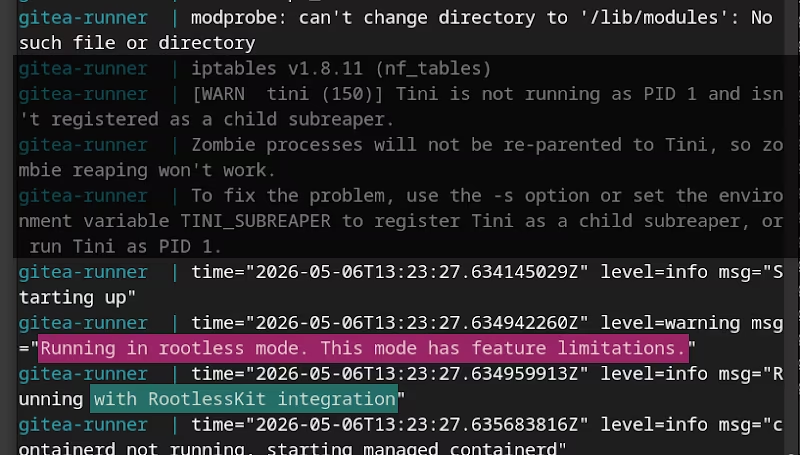
level=warning msg="[rootlesskit:child ] failed to mount sysfs, falling back to read-only mount: operation not permitted"
I cannot resolve this even with cap_add: ALL. Furthermore, online resources on this technical level are really scarce (and I am not a Docker specialist). A re-mount of the file systems might still help here; but that seems too experimental and error-prone to me.
After several more hours of research and trial and error on my server, I have to agree with @tianon in a discussion on GitHub: The Docker daemon requires so many permissions and capabilities that you might as well stick with privileged: true and avoid having to grapple with an armada of CAP_ADD and system bind mounts.
Future solution: Virtualisation or daemonless#
However, there may be better solutions: dedicated container runtime environments such as Sysbox. The box itself has no special privileges on the host system; yet, much like in a virtual machine, it appears to be able to provide applications running within it with full access and capabilities.
Covering everything from installation and setup to fully functional job containers would take this post too far afield. Therefore, for the time being I must refer to other sources.
Switching from Docker to Podman is also a possible solution: Podman is daemonless, rootless and offers a similar range of features to Docker. Migrating to Podman would be a project in its own right for me and does not fit within the scope of this post.
Linux Security Modules (seccomp, AppArmor, SELinux)#
Definition: LSM enable various security checks and restrictions at the kernel level. Through ‘Mandatory Access Control’, security extensions such as AppArmor can control kernel capabilities for individual applications and block access where necessary.
AppArmor#
I run my server (VPS) on Ubuntu. In its more recent versions, this operating system has integrated ‘user namespace creation restrictions’ into AppArmor, which prevents appimages, WebApps and containers from running with elevated privileges.
“Unprivileged user namespaces are a feature in the Linux kernel […]; it enables unprivileged users to gain administrator (root) permissions within a confined environment […]” - mbelair, Ubuntu Discourse, as of May-2026, Ubuntu Discourse Website
In short, this tool was developed as a security-hardening measure to reduce the attack surface on the host system when running programmes that require elevated privileges.
Simple solution: Disable completely#
The sledgehammer approach completely disables the feature for user namespaces. We tell AppArmor that third-party programmes may use kernel features or elevated privileges without restrictions, just as in older operating system versions. I found the relevant command on the AskUbuntu forum.
It disables restrictions for this session by overwriting the kernel parameters at runtime (-w).
schallbertTestsThis@machine:~# sudo sysctl -w kernel.apparmor_restrict_unprivileged_userns=0
I find the command very useful for troubleshooting. If you want to find out whether the desired programme is failing to start because of AppArmor:
- Enter the command above
- Test the third-party programme, the container, etc.
- Reboot. Or enter the command with
=1. This will restore the original state.
If you wish to retain this vulnerability permanently, enter:
makeVulnerability@machine:~# echo 'kernel.apparmor_restrict_unprivileged_userns = 0' | sudo tee /etc/sysctl.d/20-apparmor-donotrestrict.conf
makeVulnerability@machine:~# sudo shutdown -r now
This in itself does not constitute a security vulnerability. It has merely become easier, in principle, to exploit any weaknesses in the kernel and escape the container’s “sandbox”.
The correct solution: Tailor settings for each application#
There are applications (such as my DinD version of act_runner) that absolutely require elevated privileges to function properly. And only these should be granted the ability to access non-admin user namespaces.
Docker itself has dedicated a section in its documentation to AppAmor. To arrive at the solution for the DinD runner, a bit of transfer (thanks, @thespad) is required. To recap, here is the error message from above:
gitea-runner  | [rootlesskit:parent] error: failed to start the child: fork/exec /proc/self/exe: operation not permitted
gitea-runner  | s6-svwait: fatal: some services reported permanent failure or their supervisor died
The log file indicates that the parent (Docker daemon in the container) cannot start its child (runner container) because it cannot create processes (/proc/self) for other participants (fork). Who is the user of this daemon? rootlesskit.
This is exactly where our solution comes in: we need to enable the AppArmor profile for rootlesskit in the act_runner’s DinD container within the docker-compose.yml file.
# docker-compose.yml
# section act_runner DinD-rootless
runner:
    image: gitea/act_runner:latest-dind-rootless
    container_name: gitea-runner
    privileged: true
    security_opt:
      - apparmor=rootlesskit
    # [...]
The log file now looks fine. Done!
I get the feeling that post was written by an ‘AI’. When it gets specific and talks about ‘critical volume mounts’, there are no actual system paths listed, and the article becomes so vague overall that I can’t actually reach my goal by following the advice. ↩︎